search blog
most popular
MCP MCTS MCT MVP

SharePoint's hidden user-list - User Information List 

Okay, this might not come as news to most SharePoint developers who've been around a while, but lately I've been messing with the User Information List in SharePoint and it doesn't seem that many people know that it exists.

Note: This list is only visible to and accessible by administrators.

User Information List - Background

The User Information List stores information about a user by having some metadata set up for the user. Some examples are Picture, Email, DisplayName, LoginName etc. ) For a complete list of fields, see further down this blogpost under "User Information List Fields".

Something to note is that when a user is granted access to a site, a new item will be created in the User Information List storing some information about the user.

When a user add/create or edit an item, SharePoint will display something like "Last modified at 1/1/2008 by Tobias Zimmergren" like the following pic:

image

In this example the DisplayName (used to display System Account) is gathered from the User Information List

Browsing the User Information List

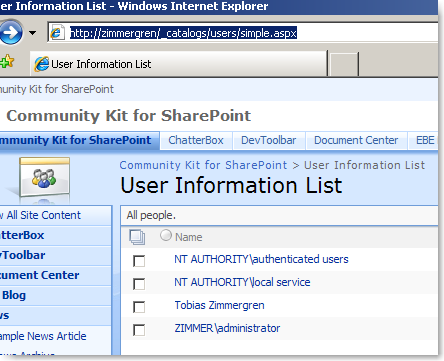
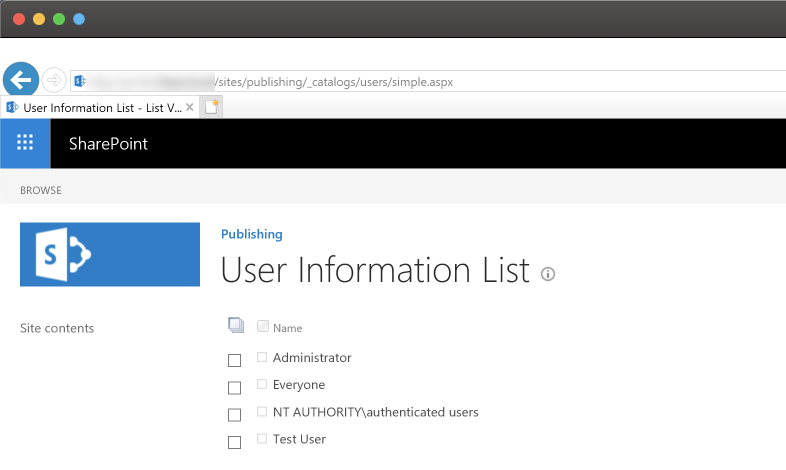
The User Information List can be accessed (Only if you're admin) via the browser by navigating to /_catalogs/users/simple.aspx from your site. (Ex: http://zimmergren/_catalogs/users/simple.aspx)

This works for both Windows SharePoint Services 3.0 (WSS 3.0) and Microsoft Office SharePoint Server 2007 (MOSS 2007) and looks like this when you access it through the browser:

image

Write code to interact with the User Information List

If you want to interact with this list to set properties on a user (Probably only want to do this if you're running WSS) you could do it like this:

// Instantiates the User Information List
SPList userInformationList = SPContext.Current.Web.SiteUserInfoList;

// Get the current user
SPUser user = SPContext.Current.Web.EnsureUser(@"ZIMMER\TobiasZimmergren");

// The actual User Information is within this SPListItem
SPListItem userItem = userInformationList.Items.GetItemById(user.ID);

The above code will give you the SPListItem object which links to the currently logged in user (the one executing the request).

You can then work with the SPListItem object like normal to get or set the properties like this:

string pictureURL = userItem["Picture"].ToString();

User Information List Fields

Instead of writing out all the fields/columns availible, you can simply create a new Console Application and insert the following code in order to output all the fields names and internalnames:

image
Note: You will ofcourse have to change the URL and User LoginName
Note2: No comments needed about not disposing the objects as this was merely a sample, eh? ;)

You're welcome

Hope this will enlighten some of you people in your quest for the holy grail (SharePoint All-Mighty Knowledge?)

Work is calling me, so I'll have to end this small post right here and right now, catch you soon again.

 
Posted on 25-Jun-08 by Tobias Zimmergren
36 Comments  |  Trackback Url  |  Link to this post | Bookmark this post with:        
Tags: MOSS 2007, WSS 3.0
 

Links to this post (Trackbacks/Pingbacks)

Comments

Wednesday, 25 Jun 2008 09:06 by Andy
yay first comment after published post 3 minutes ago! talk about quick RSS-reader! Good explanation to how you can get stuff from the list by code!

Thursday, 26 Jun 2008 09:10 by Adrian
i red about this list somewhere before but not knowing to access it was possible. this was cool. i did the consoleapplication and added to change the Picture ant it works. however you must use .Update() before the changes are complied if you make changes. cool!

Thursday, 26 Jun 2008 09:20 by Anders Hammer
Let me mention a neat thing about the SPWeb.EnsureUser function; if the user isn't already added to the User Information List, this function will do it. As Tobias wrote, when a user is granted access to a site, it will be added to the list. This function does the same thing (that's why you should always use this function instead of SPWeb.AllUsers, for example).

Thursday, 26 Jun 2008 02:46 by JHatton
We have yet to understand why this User Info comes up when you click on a name instead of being sent to the user's My Site profile. Anyone know how to get them sent to the My SIte (which is more up to date, etc) instead of the User Info screen?

Friday, 27 Jun 2008 07:00 by Russ
JHatton, I believe the reason for the user profile page rather than a direction to the My Site Profile is that there is no guaranteed that My Sites would be enabled for any WSS installation. I recently wrote a feature that plugs into the ProfileRedirection delegate redirecting users to the My Profile page. This is the best solution I have found so far.

Friday, 27 Jun 2008 04:27 by Developer
Coolio man. Cool list i didnt know off. Code works nice

Friday, 27 Jun 2008 08:25 by TJ
Hey Tobias. Could this explain some strange behavior? (See following) User "Joe Bloggs" changes some data so it is displayed "modified by Joe Bloggs". In AD this user then has their last name changed (gets married). Profile imports in central admin reflect this change for the user BUT when the user logs in or makes further changes it still displays "Joe Bloggs"? Has any one witnessed this?

Friday, 27 Jun 2008 11:05 by Tobias Zimmergren
Hi TJ, I havn't encountered the issue myself, however if you read the following blog I bet there's some info which you'll find usefull on the sync-issues: http://blogs.msdn.com/gregmcb/archive/2008/03/15/user-profiles.aspx Cheers!

Tuesday, 1 Jul 2008 12:55 by dude
dude i knew it was soemthing special with this list. been wondering for a long time, but never been able to access it haha. thanks

Thursday, 10 Jul 2008 08:44 by Vivek
Hi Tobias, actually i used this list with the help of CAML query. but now my requirement is littlebit different. Actually i want to get an event when Sharepoint Adds New user to this list..I mean at the first time when User Logs in I want him to redirect to some other page and ask him to do something else...currently I am putting my code in Master page and getting info. But is there any way to Track this kind of EVENT...waiting for your pro answer...

Friday, 11 Jul 2008 12:52 by TJ
I have looked at the list and this is to blame for the wrong name. Although the account has been updated "****\surnamef" the Name hasn't been updated "oldSurname, firstname" What I ask is, is this normal? I.E should this happen like this (bug or not) when an account is changed? Is the only answer to write a custom script to sync often? Vivek. Lists can have events attached. So why not look into list events?

Monday, 21 Jul 2008 01:08 by Ramakrishna
Hi, How to impliment this? We are using WSS 3.0 We have to create usergrps and users from active directory in sharepoint. But my requirements are we have to store 2 to 3 columns of info for every user we are creating in sharepoint. Like User, column1, column2. When we are granting permissions for any resources(like subsites,lists..) than we can able to select from already created grps not from active directory. Actually in some scenarios we need both options(from AD and sharepoint grps). So I though of using Lists to store user and grps, Than how can we refer these lists when we are granting permissions to resources ? Thanks in advance

Wednesday, 6 Aug 2008 03:32 by Priyanka
Hi Tobias, can you tell me some way to link my contacts list with the User Information List. I have a lookup column that takes values from User Information List. Now the problem is when I add a new user in the contacts list, and select some existing one from the lookup, details of the user do not get filled in the other given empty fields. I need to fire some event and fetch values for the selected user from list. But am quite unsure how to achieve this on contacts list. Any ideas? Alternatively, any idea of importing all the users in the information list to Contacts List??

Wednesday, 20 Aug 2008 07:12 by Ricky Singh
Hi I am also having the same requirement as Vivek.In my case i want to add a workflow when a new user is added to the site. how can i access this User Information List to attach a workflow with it. i just want to send an email to my help desk when ever a new user is added. i know there is AclInv.aspx page that holds the logic of sending Welcoe email to the new user. is there any way i can add another email id to send the Welcome email.

Thursday, 4 Sep 2008 04:44 by Alison
Hi, found your post searching for a way to update the pictures on User Profiles. Right now, my users can update their own, but I can't update photos or edit user information for them. Anyway to change through administration, without having to write code? Thanks!

Wednesday, 28 Jan 2009 02:46 by Anwarul
Hi Zimmergren, How to get User Group email ID with C# Code? Thanks in Advance Anwarul

Thursday, 12 Feb 2009 03:38 by lpcross
Very very cool post. I battled with this seemingly "static" UIL for quite a while. I'm still working my way up to understanding developer stuff so I've had to approach anomolies from a Sys Admin perspective. We have a Senior Vice President where I work, and his title was incorrect in the UIL, although AD and MOSS User Profile was correct. After battling this for a while I noticed that the "Title" mapped property (SSP) did not have "replicable" checked. This may or may not have made the difference since I also deleted his title, did a full AD import, then re-added his title followed by another AD import. In the end, the update finally worked. Thanks Tobias for a very useful and informative article. larry

Thursday, 12 Feb 2009 03:42 by lpcross
Very very cool post. I battled with this seemingly "static" UIL for quite a while. I'm still working my way up to understanding developer stuff so I've had to approach anomolies from a Sys Admin perspective. We have a Senior Vice President where I work, and his title was incorrect in the UIL, although AD and MOSS User Profile was correct. After battling this for a while I noticed that the "Title" mapped property (SSP) did not have "replicable" checked. This may or may not have made the difference since I also deleted his title, did a full AD import, then re-added his title followed by another AD import. In the end, the update finally worked. Thanks Tobias for a very useful and informative article. larry

Wednesday, 18 Feb 2009 09:35 by

Thursday, 12 Mar 2009 05:23 by Ali
I have a question where in first time user who access the sharepoint site which passess active directory details how can i log it?

Thursday, 19 Mar 2009 03:47 by Yesh
Thanks for the Post Tz, I have a problem in while accessing one of the property from User Information List. I have a property by Name "Business Unit". I need the internal name of this column. Is there a way to get this? Based on few googling, I tried giving ows_businessunit, but It didnt worked. Any ideas?

Wednesday, 22 Apr 2009 11:59 by Mayaa
Hello and thats for the great post. I have same question as Priyanka.if you please answer it. thanks alot

Tuesday, 12 May 2009 07:30 by
dsfsdgfvs

Tuesday, 12 May 2009 07:31 by

Wednesday, 24 Jun 2009 05:56 by

Friday, 3 Jul 2009 07:37 by panoone
I can't believe no one has asked the obvious question yet. What the heck are the checkboxes for??! :) I've tried modifying the web part to show the full toolbar but it always reverts to none. Given that the People and Groups pages are so cumbersome, this would have been a great way to mass delete unwanted users and groups. Back to the drawing board.

Friday, 10 Jul 2009 09:37 by Jetski
This is exactly what I need.. Thank you very much.. Tobias Zimmergren

Wednesday, 5 Aug 2009 07:34 by Steve Clark
Everytime a SharePoint list is linked in MSAccess2007, an instance of that directory's UIL is also linked. Add that to the grail soup.

Wednesday, 23 Sep 2009 12:01 by Tim
This is great information! Can anyone tell me how to edit for duplicate entries? When I pull this list in to an Access Database, I have about a dozen dupe items.

Wednesday, 30 Sep 2009 08:05 by

Friday, 30 Oct 2009 09:17 by JonW
I'm currently a sharepoint "noob" but would'nt userInformationList.Items.GetItemById(user.ID) Get ALL users from the list and then from the projected list get the one item by ID ? I thought that one should use the following code below instead; and retrieve only the item sought after, or am I wrong? userInformationList.GetItemById(user.ID)

Monday, 30 Nov 2009 04:44 by

Friday, 11 Dec 2009 05:38 by mohakud
Here i am passing the user name then only I can get the user details. But I dont want to pass user name. Then how to get. Please help me

Thursday, 14 Jan 2010 08:52 by Nate
In response to TJ's post on Friday, 11 Jul 2008 12:52 by TJ and partially my own extra discovery. Yea I am seeing that the info is never updated but also, I have found that I can't delete the user account from the User Info List--meaning that when you do delete a user from the site collection, it seems that it just makes it invisible. Because when you actually go and add back that same user from AD hoping to bring in any AD changes, those changes don't come over and one other clue... The ID given to the user is the same as was previously used. Meaning that even though the user doesn't appear in the UIL after deletion sharepoint is keeping the info somewhere..

Tuesday, 2 Feb 2010 04:46 by Chris
"If you want to interact with this list to set properties on a user (Probably only want to do this if you're running WSS)" Why is this not suggested for MOSS?

Name:
URL:
Email:
Comments: