
Starting a SharePoint workflow from code (Event Receiver)

Table of Contents
In one of my current projects, I was facing the issue of triggering a workflow – but didn’t want the entire workflow to kick off unless absolutely necessary.
Instead of the traditional approach where you hook up your workflow to trigger new items or items being changed, I want to make a check to see if anything really had changed and then check a few other variables before even starting the workflow at all.
This resulted in me creating an Event Receiver which then could take care of the logic to see if the workflow should start or not. (Note that you’ll have to assess if this approach is doable in your situation, as it might not be applicable in all scenarios)
With this post I presume that you’ve got basic knowledge in creating a workflow and event receivers and will simply jump to the place in the code where my receiver takes care of the validation stuff and then (if validation == okay) starts the workflow.
Start a SharePoint workflow programmatically
In the Workflow project
First of all, in your workflow project (In my case it’s a SharePoint Sequential Workflow) – look for the following line of code as shown below (usually in the AssemblyInfo.cs file) and remember and/or note this GUID. This is the GUID we need to know in order to identify our workflow from the Event Receiver
Locate and note the GUID of your WF (AssemblyInfo.cs)

Note; In my Workflow project, I choose not to hook the workflow up with “Start at item change” since I don’t want the WF to start (at all) unless I have validated a few variables first (done in the Event Receiver)
In the Event Receiver project
**Complete code block for the Event Receiver
**My code looks like this but the custom logic for validating weather to start the WF or not, has been removed
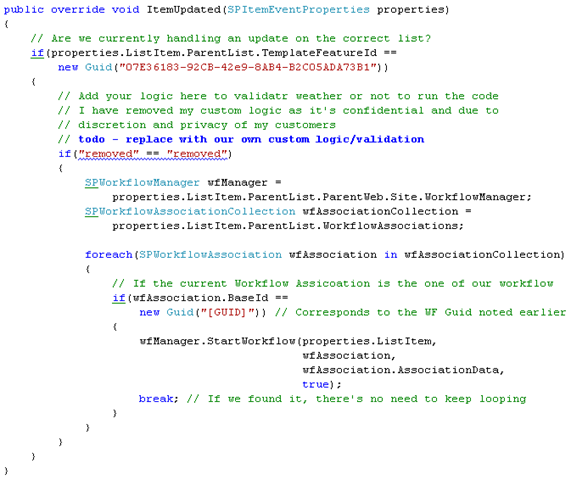
The important part we need to focus on is the wfManager.StartWorkflow() method, which is the code that actually starts the workflow if certain criteria are met as per the checks above.
Summary
I wrote this post as a reminder to myself when I need to kick-start a workflow somehow, but I do hope it can help someone else out there as well.
Have a great weekend!




Recent comments