

SPTraceView - Easy overview of the SharePoint logs (ULS logs)

If you are a SharePoint developer, you often need to dig into the logs in the 12-hive in order to find out why things are behaving the way they are.
You and me both know that this can be a pain in the buttocks if you don’t have an appropriate tool to read the logs with.
I’ve been trying out around 10 different log viewers, including SharePoint-specific log viewers, in order to save some time reading the logs.
What I found out, was that the tool called SPTraceView that you an find on www.codeplex.com, is the by far most complete SharePoint logs parsing tool I’ve tried.
Bear in mind though, that there’s plenty of good tools out there – and this is the one that I find to be most suitable for my needs. Your requirements may differ.
Why SPTraceView for me?
The reasons as to why I chose SPTraceView are as follows:
- Balloon notifications when new events occur (e.g. an exception is thrown and shown in the logs)
- Filtering
- Filter based on Monitoring Level
- Critical Event
- Unexpected
- Exception
- Warning Event
- Assert
- Unassigned
- High
- Medium
- Information Event
- Monitorable
- Verbose
- Filter based on Process
- Filter based on Message
- Filter based on Product
- Filter based on Category
- Big "View Events" button to quickly parse and view the logs, applying all the filters you’ve configured
- Farm event logging / Cross-server logging
- You have the option to use SPTraceView across multiple servers in your farm (!)
An example
The plain-text logfiles in SharePoint looks something like this

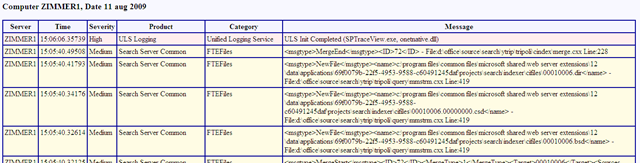
Viewing the SharePoint ULS logs with SPTraceView
If I make a simple configuration like this:
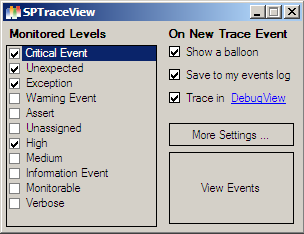
And if I now click the big "View Events" button (you really can’t miss it!) – it’ll look something like this:
Summary and Download
I urge you to check out this tool if you’re (like me) diving into the logs every now and then, but find it unbearable to read plain-text and don’t find that any of the other tools really fit the blueprint of what you need.
With that said, go to www.codeplex.com/sptraceview and get it now!





)
Recent comments