

SP 2010: Validate Sandboxed Solutions using SPSolutionValidator

If you’ve been playing around with SharePoint 2010 lately, you’ve most likely noticed a new concept introduced as "Sandbox Solutions".
With sandboxed solutions (read more about them here: http://msdn.microsoft.com/en-us/library/ee536577(office.14).aspx) comes the possibility to scope your solutions to Site Collection (into the new Solution gallery).
A question I often get is how you can validate those solutions automatically, and therefore I’ll lay out the basic principles of creating a Sandbox Solution Validator which now is part of the SharePoint object model.
What will happen?
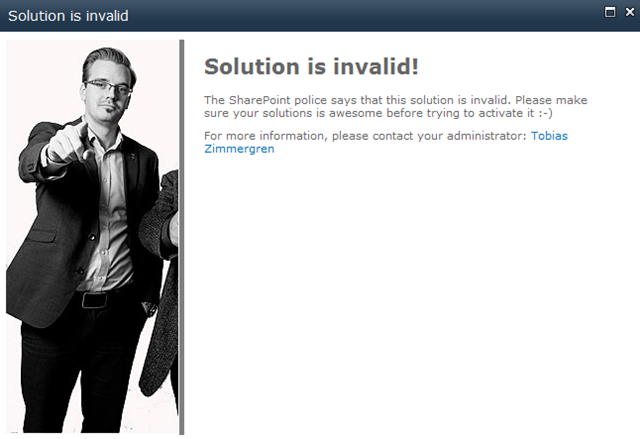
If you have a custom Solution Validator hooked up with your farm, a custom error page will be displayed, and the solution will not be activated.
If you try to activate the solution:
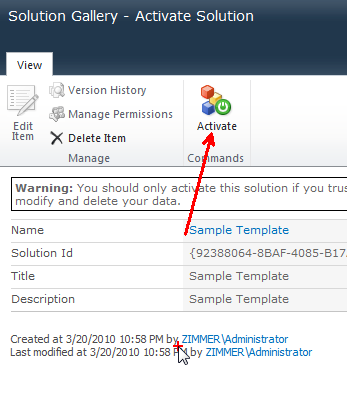
Our custom Solution Validator kicks in and in this case disallows the solution and displays the following custom error page:
So, let’s get down to business!
Building a Solution Validator
What we need:
A Solution Validator
A feature to install/uninstall the validator in our Farm
Let’s begin by creating our custom Solution Validator class
Essentially this is just a simple class, inheriting from SPSolutionValidator which gives us some methods we can override. Check this example out:
using System.Runtime.InteropServices;
using Microsoft.SharePoint.UserCode;
using Microsoft.SharePoint.Administration;
namespace

Zimmergren._2010.SolutionValidation
{
    [Guid("29e3702d-5d8c-45ad-b1aa-a2087b9e8585")]
    public class ZimmergrenSolutionValidator : SPSolutionValidator
    {
        private const string myAwesomeValidator = "ZimmergrenSolutionValidator";

        // Not used, but needed for deployment and compilation
        public ZimmergrenSolutionValidator() { }

        public ZimmergrenSolutionValidator(SPUserCodeService sandboxService) :
                           base(myAwesomeValidator, sandboxService)
        {
            // Use this to define a unique identification number
            // You may need this when updating/modifying the validator
            Signature = 666;
        }

        public override void ValidateSolution(SPSolutionValidationProperties properties)
        {
            base.ValidateSolution(properties);

            // Set to false if you want invalidate the solution
            // Set to true (default) if you want to validate
            properties.Valid = false; // Being evil and invalidates all solutions for test!

            // Then specify an errorpage to display
            // Tip: Create a nice application page for this..
            properties.ValidationErrorUrl =
                      "/_layouts/Zimmergren.2010.SolutionValidation/InvalidSolution.aspx";
        }
    }
}
In my sample I used an override of the ValidateSolution method and invalidated the solution to show you that it actually works.
The two most suitable methods for overriding are:
We need to make easy install-able (Read: Feature)
In order for our awesome solution validator (which in this case is very slim and don’t really do any real validation, rather invalidates all solutions) – we need to let the SPUserCode service (Sandboxed Solution Service in layman terms) know that we want to hook it up.
This can easily be done using a Farm feature, using PowerShell or just Object Model code in any application.
My approach is of course to make it as easy as possible for the end-user and administrator, so I’ll create a Farm Feature with the following snippets of code:
[Guid("d0d086ec-2bef-45e8-be8b-a67895c1bd3b")]
public class ZimmergrenSolutionValidatorEventReceiver : SPFeatureReceiver
{
    public override void FeatureActivated(SPFeatureReceiverProperties properties)
    {
        SPUserCodeService sandboxService = SPUserCodeService.Local;
        SPSolutionValidator zimmerValidator =
                new ZimmergrenSolutionValidator(sandboxService);
        sandboxService.SolutionValidators.Add(zimmerValidator);
    }

    public override void FeatureDeactivating(SPFeatureReceiverProperties properties)
    {
        SPUserCodeService sandboxService = SPUserCodeService.Local;
        Guid zimmerValidatorId =
                sandboxService.SolutionValidators["ZimmergrenSolutionValidator"].Id;
        sandboxService.SolutionValidators.Remove(zimmerValidatorId);
    }
}
Summary
If you want to create some kind of check to automatically validate solution that are uploaded by end-users in their Solution Galleries, this is the way to do it.
Solution validators are very easy to write, and they can be installed using a few different approaches. My take is to create a farm feature, while you could still do it using powershell or in any way you want through the object model.
Good resources on Sandboxed Solutions:
Enjoy!






Recent comments